
Introduction
Lizard is an AI-native cloud deployment platform designed specifically for coding agents like Claude Code, Codex, and Cursor. It abstracts away infrastructure complexity, allowing developers to ship applications, databases, and sandboxes with a single command. With per-second billing, managed Postgres, Redis, and S3, and a machine-readable CLI, Lizard positions itself as the deployment layer for the agentic development era. This review explores its features, workflow, use cases, and pricing.
Key Features
-
Git push to deploy: Lizard automatically detects the application stack when code is pushed to a connected Git repository. The build planner, lizardpack, identifies the language, framework, and package manager, then generates a multi-stage Dockerfile. This makes builds transparent and editable, unlike many PaaS platforms that obscure the build process.
-
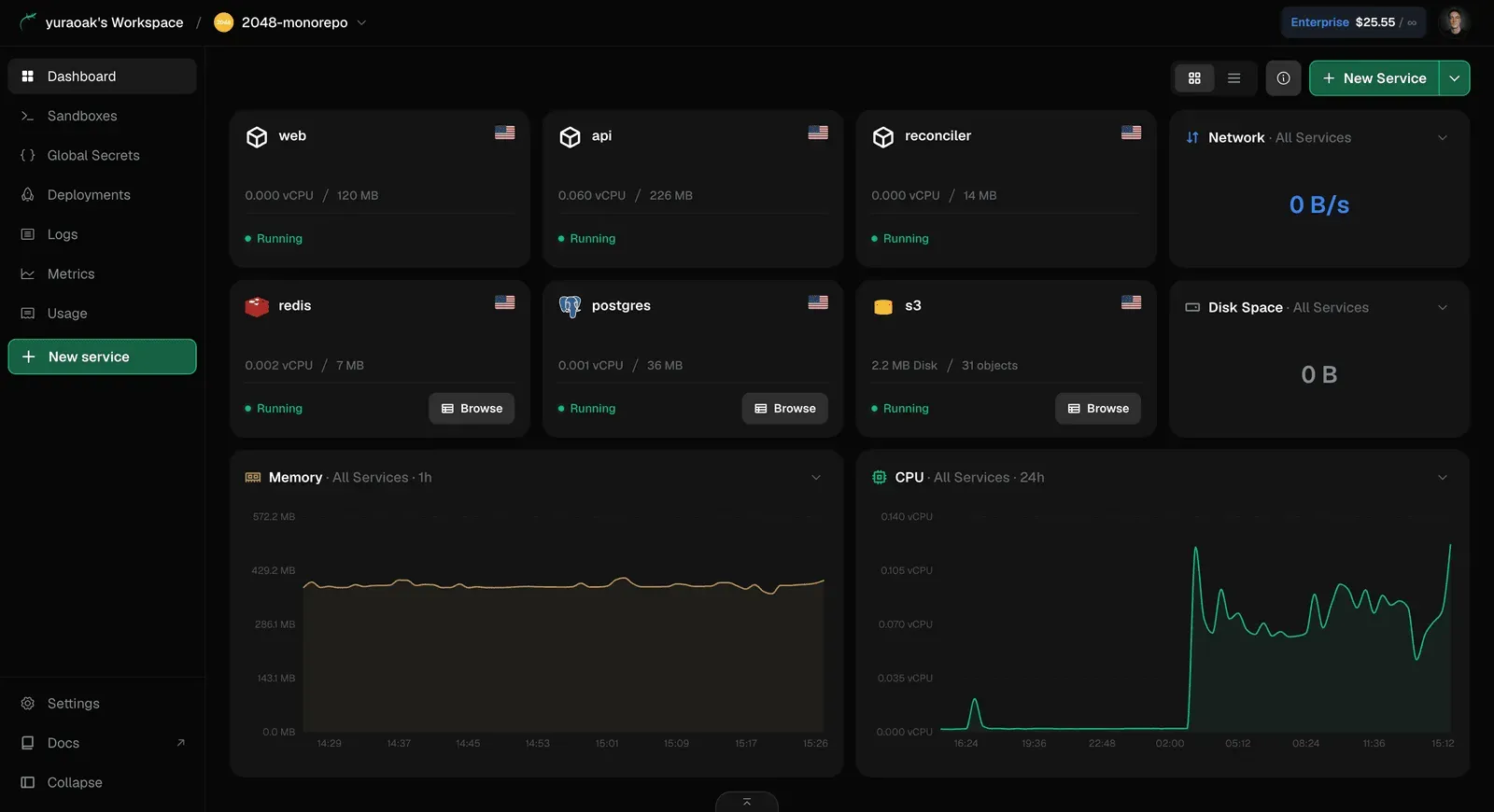
Managed data services: Provisioning Postgres, Redis, and S3 is done with simple CLI commands or dashboard actions. These services are automatically connected to applications, eliminating manual environment variable configuration.
-
Per-second billing: Lizard charges for measured CPU, memory, and egress rather than reserved instance sizes. Idle applications have near-zero vCPU usage, and memory is evicted when not touched, so users only pay for actual consumption. This model can cut costs significantly, especially for intermittent workloads.
-
Agent-first CLI: The command-line interface outputs machine-readable JSON schemas for every command, deploy event, and log stream. This enables coding agents to interpret results, diagnose failures, and propose fixes without human intervention. Human developers still get a familiar terminal experience.
-
Live logs and metrics: Every service includes built-in log streaming and request metrics, viewable in the dashboard or via CLI. This allows quick debugging and performance monitoring directly from the deployment environment.
-
Isolated containers: Each application runs in its own secure pod, ensuring isolation and resource limits. Multiple replicas can be scaled across regions, with flags indicating healthy status.
-
Broad stack support: Lizard supports Node.js, Python, Go, Rust, Ruby, PHP, Java, .NET, and static sites, as well as Dockerfiles for custom setups. It also covers package managers like bun and uv.
-
Comparison tool: The homepage includes an interactive cost calculator that compares Lizard's pricing against AWS, Render, Fly.io, and DigitalOcean, demonstrating potential savings based on CPU and memory utilization.
How It Works
The workflow starts with installing the Lizard CLI globally via npm. Users authenticate and can either link a Git repository or use lizard up to deploy from the current directory. For agents, the CLI is designed to be discoverable and parseable; every command returns structured output.
When a push is made, Lizard’s build planner scans the repository, determines the stack, and writes a multistage Dockerfile. The platform then orchestrates the build, run, and deployment in isolated containers. Managed services like Postgres and Redis can be created with simple commands, and their connection strings are injected into the application environment automatically.
The dashboard provides a real-time view of deployments, resource usage, logs, and costs. Users can monitor CPU and memory per service, inspect recent deploy activity, and drill down into per-second billing breakdowns. The CLI mirrors these capabilities, making it easy to embed deployment in scripts or AI agent toolchains.
For migrations, Lizard offers a skill that coding agents can install. When invoked, the agent can carry over services, secrets, environments, and data from Railway, Render, or Heroku into Lizard, streamlining platform switches.
Use Cases
-
Solo developers building side projects: Lizard’s free tier includes $5 of credit, and the Hobby plan covers typical side projects at $5/month. The per-second billing ensures low costs for rarely used apps.
-
Startups using AI development agents: Teams relying on Claude Code, Codex, or Cursor can instruct agents to deploy directly. The machine-readable CLI enables agents to fix failed deployments autonomously.
-
Agencies delivering client work: Lizard’s isolation and multi-service support allow agencies to spin up staging and production environments quickly, with easy rollbacks and cost tracking.
-
Prototyping and rapid iteration: The sandboxes feature provides code interpreter environments with typed results, which are useful for testing ideas without affecting production.
-
Teams migrating from traditional PaaS: The migration skill reduces manual effort, letting agents replicate existing infrastructure and data.
-
Enterprises with compliance needs: The Enterprise plan offers SOC 2, HIPAA, SSO/SAML, RBAC, and audit logs, making it suitable for regulated industries.
Pricing & Value
Lizard pricing is usage-based, with a free plan that requires no credit card and provides $5 of credit for the first month. The Hobby plan starts at $5 per month, which the website claims covers a typical side project with room to spare. Professional and Enterprise tiers are mentioned in the FAQ, with Enterprise adding compliance features.
The cost comparison tool suggests that for a small app running a Postgres database, Lizard costs $32.57/month, which is 41% less than AWS’s $55.66 for equivalent resources. The platform’s per-second billing eliminates the need to overprovision, and idle workloads cost almost nothing. This pricing model is particularly attractive for AI-driven development cycles where applications may be deployed and torn down frequently.
Final Verdict
Lizard addresses a real gap in the deployment space: making cloud infrastructure accessible to AI agents. Its agent-first design, transparent builds, and per-second billing are standout features. The platform’s support for managed databases and object storage reduces external dependencies, while the migration skill simplifies onboarding from other PaaS providers.
However, Lizard is a relatively young platform, and some advanced features may still be evolving. The comparison chart only covers a few competitors, and the docs documentation should be consulted for edge cases. For teams already leveraging AI coding assistants, Lizard offers a practical, cost-efficient path to production. It is definitely worth experimenting with, especially given the free credit and straightforward onboarding. For those interested, the pricing page provides detailed tier comparisons, and the blog shares updates and user stories.