
Overview
GeckoStats is a web analytics service built around a single question: which piece of traffic actually produced money? Most analytics suites answer a neighboring question — how many people arrived, how long they stayed, which pages they opened — and leave the operator to guess at the connection between a referrer and a payment. GeckoStats closes that gap by wiring payment-provider webhooks into the visitor record, so every sale is stamped with the channel, campaign, referrer or search query that preceded it.
The product is positioned squarely between two established camps. On one side sit privacy-focused, cookieless tools such as Plausible, Fathom, Simple Analytics and Umami, which emphasize small scripts and GDPR-friendly defaults but generally stop at traffic reporting. On the other side sit heavyweight product-analytics and e-commerce stacks that can attribute revenue but demand significant setup, a cookie banner and often a data team. GeckoStats stakes out the middle: a lightweight tracker, no cookies by default, and revenue attribution as the headline feature rather than an add-on. The company publishes direct comparison pages against each of those rivals, and the marketing copy is unusually explicit about where it believes the alternatives fall short.
The vendor's framing is aimed at people who sell something — indie founders, newsletter writers, small SaaS teams — rather than at enterprise marketing departments. Pricing starts low, the free trial runs seven days on every tier, and the entire feature set is available on both plans, with the ladder between Starter and Growth defined by site count and seats rather than by feature gating. What follows is a practical breakdown of what the platform does, how a team would actually operate it day to day, and where its limits become visible.
Key Features
Revenue attribution across payment providers. The core mechanic links a stored visitor identifier to the checkout and back again through a payment webhook. Stripe, Dodo Payments, Polar and Creem are supported out of the box with one webhook each, and any other processor can report a payment through a single API call carrying an amount and a visitor id. When the identifier is missing, the system falls back through a defined sequence — return page, the customer's earlier payments, an email passed to an identify call, and finally checkout timing — and the dashboard reports which method matched. Credit is assigned to the last visit that arrived from a real source, which means a tweet still receives credit when the buyer returns directly two weeks later.
Individual customer journey profiles. Opening any paying customer reveals a chronological timeline of every session, page, goal and payment, including the first source, total spend and time to first payment. Device, browser, city and operating system are shown alongside. This is the feature that converts attribution from a chart into an explanation: an operator can read the exact path from an initial social click through a pricing page visit to a completed checkout, including the multi-day gaps in between.
Campaign-level reporting with UTM granularity. A tagged link per tweet, article or newsletter issue appears by name in a campaigns view, paired with both visitor counts and the revenue it generated. The site's own example shows a launch tweet producing several hundred dollars against a podcast episode producing nothing, which is the kind of ranking decision the product is designed to support. Campaign, referrer, channel and keyword are switchable dimensions on the same table.
Search Console integration priced by revenue. Connecting a Google Search Console property brings in every query, page and country ranking, with an estimated revenue figure placed beside each. Queries are ranked by what they earn rather than by click volume or position. The values are explicitly marked with an approximation symbol, because Google never ties an individual query to a person; the vendor states plainly that a page is only priced once it has traffic. This honesty about estimation is a notable choice in a category that often presents modeled data as hard fact.
AI crawler observability. A dedicated view lists which AI agents — ChatGPT, Claude, Perplexity, Gemini — read pages on the site, how many pages each read, how many visitors each subsequently sent back, and the revenue those visitors produced. The vendor notes the technical reason this requires server-side reporting: crawlers do not execute JavaScript, so a client-side tracker script cannot observe them. The comparison of pages consumed against traffic returned is an unusual metric and one that is becoming more relevant as AI referral traffic grows.
MCP server and REST API for agent access. GeckoStats exposes itself as a Model Context Protocol server with 26 tools covering overview, sources, pages, campaigns, goals, funnels, customers, search queries, releases and live view. Setup is a single command or a connector entry in clients including Claude, Claude Code, ChatGPT, Cursor, Grok and Gemini CLI. Keys are issued per website and revocable from settings, and agents are read-only by default. The same read path serves both the dashboard and the agent, so the numbers are identical rather than a replicated copy.
Realtime globe and activity feed. A live map shows everyone currently on the site, alongside a streaming feed of pageviews, goals and payments as they occur. An optional sound plays on each sale. The feature is decorative in the strict sense but serves a genuine operational purpose during a launch window, when confirmation that tracking is working matters more than a historical chart.
Supporting analytics primitives. Goals and funnels handle button clicks and signups with step-by-step drop-off; one-click filters propagate a selected row across the entire dashboard; subscription metrics cover MRR, churn and lifetime value segmented by acquisition source; alerts fire when tracking stops, revenue drops, organic clicks fall, a page is deindexed or a query loses five positions; release markers place a tag on the chart via a single curl at deploy time; retention reports show week-over-week returners and their value; and any period can be exported as a rendered PNG rather than a screenshot. Tracking is cookieless by default, with a salted hash of IP, user agent and site that rotates daily and no stored IP addresses.
How It Works
Onboarding begins with account creation and the addition of a website, which yields a tracking snippet. The script is 6.6 KB gzipped, carries no dependencies and loads after the page, so the performance objection that usually accompanies analytics installation is largely addressed. Teams that prefer to avoid ad blockers can serve the script from their own domain using a one-line rewrite; payment records arrive through the webhook regardless of whether the tracker was blocked.
The second step is connecting a payment provider. For Stripe, Polar, Creem or Dodo Payments this means registering a webhook — the vendor describes it as one webhook per provider. For anything else, a server-side call transmits the payment amount and the visitor identifier. This is the configuration step that unlocks the product's central value; without it, GeckoStats behaves like a competent but conventional privacy-friendly analytics tool.
Third, Search Console is authorized once if organic search reporting matters. Queries, pages and countries flow in, and revenue is apportioned to landing pages using the payment data already collected. No crawler is involved — the integration reads what Google already knows.
Fourth, goals are defined. A click on a signup button, a completed form submission or an account creation becomes a tracked event, and funnels are assembled from those steps. Because payments are events too, funnels can terminate in revenue rather than in a pageview.
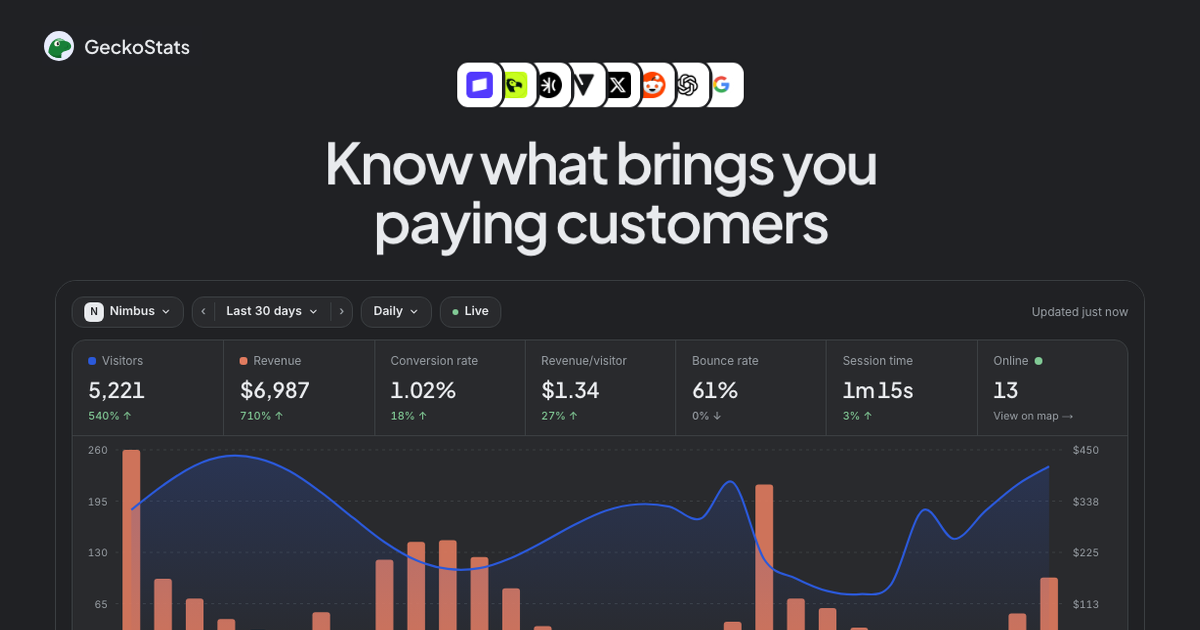
Day-to-day use centers on the overview screen, where visitors and revenue are plotted together on one chart with payment markers. Clicking any row — a channel, a country, a campaign — filters the entire dashboard. Campaign tables answer which specific post paid; customer profiles answer why a particular individual converted; the Search Console view answers which query is worth further investment. During a launch, the live globe and feed provide immediate confirmation. For teams working with an AI assistant, the MCP server means those same questions can be asked in natural language inside an editor or chat client, with the agent reading the identical data path.
Use Cases
Solo SaaS founders evaluating content spend. A founder publishing to a blog, X and a newsletter needs to know which channel converts rather than which drives the most clicks. With UTM-tagged links per post and Stripe connected, the campaigns view ranks each piece of content by dollars generated. The outcome is a defensible decision to double down on one channel and abandon another, based on revenue rather than on engagement proxies. The live demo shows the shape of this reporting with sample data clearly labeled as such.
Newsletter and podcast creators with irregular publishing. A writer sending three issues a month and occasionally appearing on podcasts can tag each distribution separately. Because attribution survives a multi-day gap and credits the last visit from a real source, a subscriber who reads an issue, browses later and buys two weeks afterward still traces back to the newsletter. The measurable outcome is a per-issue revenue figure, which is materially more useful for sponsorship pricing than open rates.
Small development teams shipping frequently. A team deploying several times a week can post a release marker at the end of each deploy. When a metric moves, the chart shows which release preceded it. Combined with the alerting rules — tracking stopped, revenue down, a page deindexed — the setup replaces a manual morning dashboard check. Engineers who prefer their editor to a browser tab can query the same data through Cursor or Claude Code via the MCP server.
Content marketers competing in search and AI surfaces. A marketer managing organic acquisition connects Search Console to see which queries earn rather than which attract volume, and monitors the AI crawler panel to understand what language models are reading and whether that consumption returns visitors. This dual view addresses a genuine blind spot, since conventional analytics cannot see non-JavaScript crawlers at all.
Privacy-sensitive businesses in regulated markets. An organization that wants aggregate analytics without a consent banner can rely on the cookieless default: a daily-rotating hash, no stored IPs, no cross-site or cross-day identity. The vendor is careful to note that enabling cookie mode changes this calculus and warrants legal advice. Teams comparing this posture against established privacy-first tools can review the head-to-head comparison against Plausible, which the vendor publishes with both sides' advantages named.
Pricing & Value
Two plans are offered, both including the complete feature set — revenue attribution, Search Console, the AI assistant and the MCP server appear on every tier. The difference is organizational scale.
Starter is $17 per month at the 100K-event level, covering one website and a single user.
Growth is $35 per month at the same event volume, raising the ceiling to 30 websites and 30 team seats.
Event volume is selected with a slider running from 25K to 10M events per month, and both plans sit on the same ladder; Growth simply adds sites and people. A payment, a pageview or a defined goal each counts as one event, while crawler hits are counted separately and do not consume quota. Annual billing carries a stated 17% discount. Every plan starts with a seven-day free trial, cancelable at any time. Prices exclude VAT, which may apply at checkout.
Overage is handled softly: counting continues, the account receives a suggestion to move up, and two consecutive over-quota months prompt a request to upgrade. Nothing is truncated. The value proposition is straightforward — revenue attribution at this price point is rare, and the absence of feature gating between tiers means a small team pays for capacity rather than for capability. Whether the entry price is competitive depends on whether attribution is the priority; buyers who only want pageview counts will find cheaper options, and the vendor's pricing page lays out the ladder without hiding the volume tiers behind a sales call.
Who It's For
The product fits founders, indie hackers, newsletter operators and small SaaS teams that sell online and want to connect marketing effort to money without assembling a data stack. It suits teams already using Stripe, Polar, Creem or Dodo Payments, since those integrations require nothing beyond a webhook. It also suits engineering-led organizations that would rather query analytics from an editor through MCP than open a dashboard, and privacy-conscious businesses that want useful reporting without a consent banner.
It is a weaker fit for enterprises requiring warehouse sync, custom data retention policies, SSO or dedicated support — none of which are described on the site. Organizations with complex multi-touch attribution models, offline conversion imports or CRM-level pipeline reporting will find the model simpler than they need. Teams already deep in a product-analytics platform may prefer to add a revenue connector there rather than run a second tool. And anyone whose business model does not involve a payment event at all will pay for attribution machinery they cannot use.
Final Thoughts
GeckoStats makes a coherent argument: the interesting question in web analytics is not how many people came, but which of them paid and what sent them. The execution is disciplined. Attribution falls back through a defined, disclosed sequence rather than a black box, estimation is labeled as estimation, and demo data announces itself. The Search Console revenue column, the AI crawler read-versus-returned comparison and the per-site revocable MCP keys reflect genuine attention to how small teams actually work in 2026.
The strongest assets are the revenue-first data model, the breadth of payment integrations, and the MCP server that makes the same numbers available to an AI assistant without duplicating the pipeline. The weakest areas are scale and depth: no disclosed enterprise controls, no warehouse export described, a two-tier structure that will feel constraining to agencies managing many small client sites, and attribution logic that is deliberately single-touch in its final credit rule. The cookieless default is a real advantage but also limits cross-day identity unless cookie mode is enabled, at which point the compliance argument shifts.
For a founder or small team selling online who wants to know which post paid for lunch, this is a well-targeted tool at a reasonable price with a genuinely useful free trial. For organizations needing enterprise governance or sophisticated multi-touch modeling, it is a complementary dashboard rather than a replacement for a full measurement stack.