
Long-form video is full of hidden gems, but finding and editing them into short-form clips is a tedious, time-consuming job. BlitzReels aims to eliminate that grunt work. The platform uses artificial intelligence to scan a video's transcript, rank each segment for its potential to go viral, and then generate branded, captioned clips ready for TikTok, Instagram Reels, YouTube Shorts, and LinkedIn. With support for YouTube links, direct uploads (Loom, Zoom, webinars, podcasts, course lessons), and even an MCP server for agentic workflows, BlitzReels presents itself as more than just a caption tool. This review breaks down its features, user experience, pricing model, and practical applications, using only the details visible on the site.
Key Features
BlitzReels is packed with features that go far beyond basic video cutting. It's a full-fledged content repurposing engine. Let's look at the most important modules:
AI-Driven Clip Extraction and Scoring
The core algorithm reads the entire transcript and evaluates every section on multiple axes—hook strength, narrative clarity, potential viewer retention, and alignment with a stated offer. Each segment gets a score, and the platform highlights the highest-ranking moments. This is a smarter approach than simply picking random timestamps, as it considers both the content and the context.
Multi-Format Source Import
The homepage highlights integration with YouTube, Loom, Zoom, webinars, podcasts, screen-share tutorials, and course lessons. For local files, users can drag and drop MP4 files. The service automatically transcribes the audio, detects speaker changes, and timestamps everything. This means the workflow is identical whether the source is a 3-hour podcast or a 15-minute tutorial.
Customizable Branded Captions and Templates
Every generated clip includes stylized captions that adapt to the speaker's tone. Users can choose from a library of caption styles—animated text, karaoke-style highlights, or minimal bottom-third overlays. The platform also offers layout templates for each social network, ensuring the aspect ratio and safe zones are never a concern. Branding elements like logos, color palettes, and font choices can be applied across all clips, maintaining a consistent look.
Batch Processing and Bulk Export
One long video can yield hundreds of clips. BlitzReels organizes them in a queue, letting users sort by score, duration, or timestamp. Multiple clips can be selected and exported as individual files or as a ZIP archive. This is crucial for agencies managing several accounts at once.
Agent and API Integrations
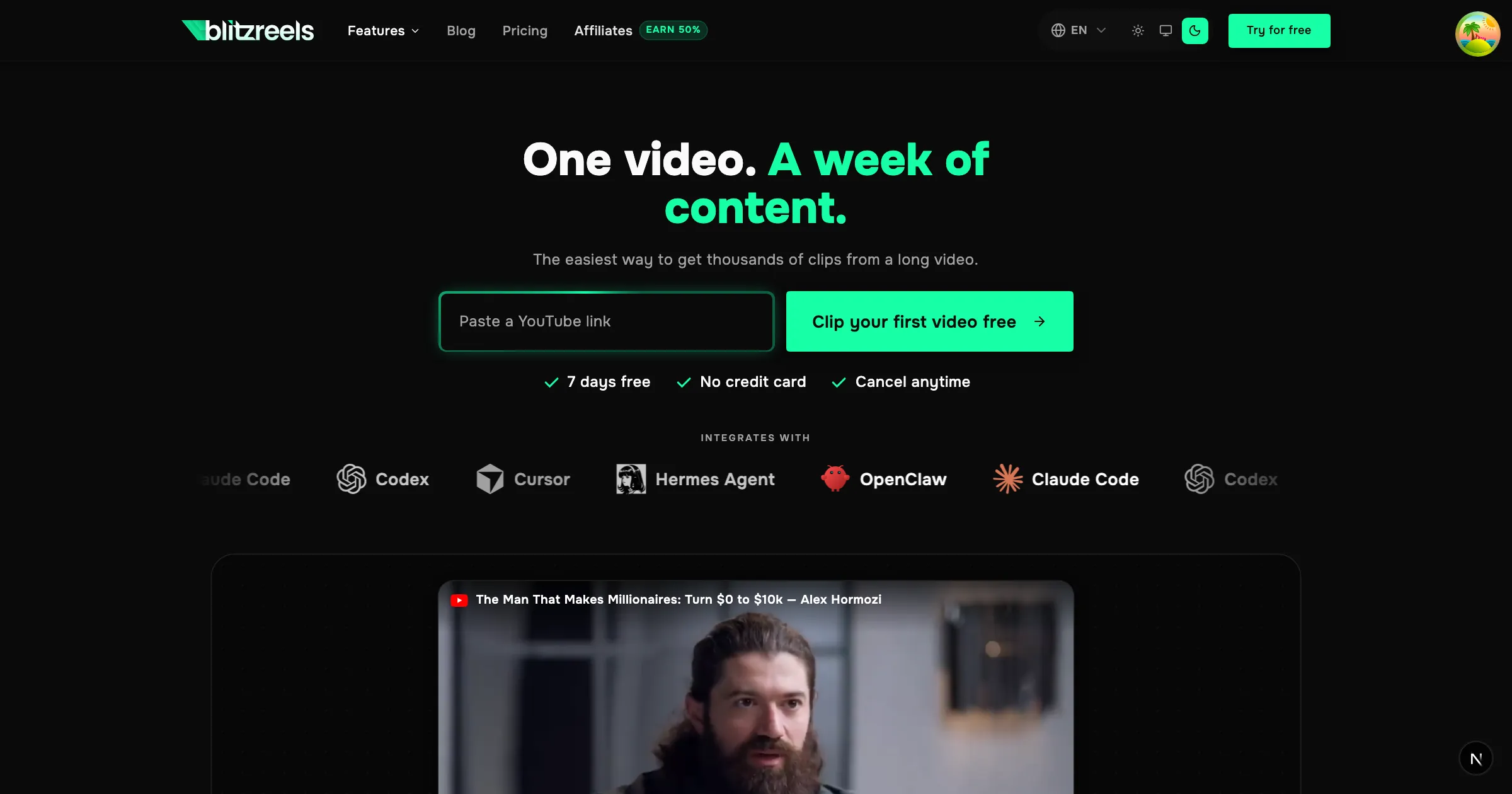
A rare feature among consumer video tools: BlitzReels exposes an MCP server, API, and CLI. This allows AI agents like Claude Code, Codex, and Cursor to programmatically trigger clip generation, fetch results, and even edit parameters. The agent integrations page explains how to set up these workflows, making it possible to build a fully automated content pipeline.
AI Studio and Faceless Video Generation
Beyond repurposing, BlitzReels includes an AI Studio for prompt-to-video generation. Users can describe a scene and get a video, choose visual styles, and let the system auto-insert B-rolls. There's even a faceless video mode for channels that don't want to show a person. This transforms the tool into a complete content creation suite.
Handy Utilities Toolkit
The footer reveals a collection of free tools: an SRT editor, subtitle generator, video compressor, format converter (MP4, audio, GIF), image resizer, background remover, and more. These are accessible on the site and add practical value for everyday editing needs, even if a user doesn't run the full AI pipeline.
How It Works
Getting started is deceptively simple. The landing page features a large input box that says "Paste a YouTube link." Users can also click to upload a file. After submission, the video is uploaded and processed through a series of steps: transcription, segment analysis, caption generation, and scoring. The UI shows a progress indicator with labels like "Uploading," "Analyzing video," and "Writing captions," which reassures the user that the magic is happening.
Once processing is complete, the main workspace displays a timeline of the source video with highlighted regions representing the most promising clips. Each highlight has a score—likely based on engagement potential. Clicking a highlight loads a preview player in the clip editor, where the user can see the captions overlaid and read the generated hook. The interface also suggests a caption for the social post, complete with relevant hashtags. Users can edit any of these elements directly.
After refining a clip, the user hits "Export," and the video is rendered in the selected format and resolution. Multiple clips can be exported together, and the system strips out any silence or filler words. The entire batch operation is designed to take minutes rather than hours.
For the automation crowd, the API and MCP server follow a RESTful pattern. A developer or agent can POST a video source, receive a list of clip objects with scores, then request rendering for the chosen clips. This is a powerful paradigm for anyone interested in programmatic content marketing.
Use Cases
BlitzReels tailors to a wide spectrum of users. Here are the most obvious practical scenarios:
- Content creators and influencers who publish daily on multiple platforms can turn a single long-form video into a week's worth of posts. The AI ensures that the clips are punchy and standalone, with proper CTAs.
- Podcasters can quickly pull quote-worthy moments from an episode and distribute them as short video snippets on TikTok and Instagram, increasing their reach beyond the audio-only feed.
- Course creators and educators can generate teasers for their lessons from a recorded training session, and even create promotional clips that highlight key insights.
- Marketing teams and social media agencies often manage a mountain of long-form product demos, webinars, and customer calls. BlitzReels lets them produce a consistent stream of branded short-form videos without assigning a full-time editor.
- SaaS companies can repurpose onboarding videos and feature walkthroughs into social proof clips, sharing them across LinkedIn and YouTube Shorts to attract new users.
- AI agents and developers can build custom workflows: a cron job that watches a YouTube channel, fetches new videos, generates clips, and posts them to a social media API. The MCP integration makes BlitzReels a building block in a larger automation stack.
Pricing & Value
The site does not list a public price on the landing page. Instead, it offers a 7-day free trial with a credit card requirement. After the trial, users must choose a subscription plan, likely tiered by the number of processing minutes or exports. The pricing page holds the details.
Given the feature set—automated scoring, branded templates, API access, and batch utilities—a subscription is likely competitive with tools like Opus Clip or Submagic, but BlitzReels adds a unique agent-first angle. For a creator who publishes daily, the time savings are substantial. Even if we assume it saves 15 minutes per clip, generating 10 clips a week saves 2.5 hours. Multiply that by the hourly value of a professional editor, and the tool pays for itself quickly. The free trial allows a hands-on evaluation before any commitment, which is sensible for a paid subscription tool.
Final Verdict
BlitzReels is a polished AI video repurposing platform that excels at what it promises: turning one long video into a steady stream of branded short clips. The sentiment analysis and segment scoring are a step above the typical "auto captions" tools, and the integration with AI agents via MCP/API is a forward-looking feature that will appeal to developers and forward-thinking marketers. The inclusion of faceless video generation and a suite of free utilities adds versatility.
The main drawbacks are the lack of transparent pricing and the mandatory credit card trial. Also, since the platform is web-only, there's no mobile app for on-the-go editing. Some users may find the scoring algorithm's choices don't always match their taste, but the ability to manually adjust mitigates that concern.
For creators, agencies, and automation enthusiasts who produce long-form video content regularly, BlitzReels is worth a try. The features page offers a comprehensive look at every capability, and its agent integrations allow deeper automation. For anyone serious about maximizing video ROI, BlitzReels delivers on its promise.