
Introduction
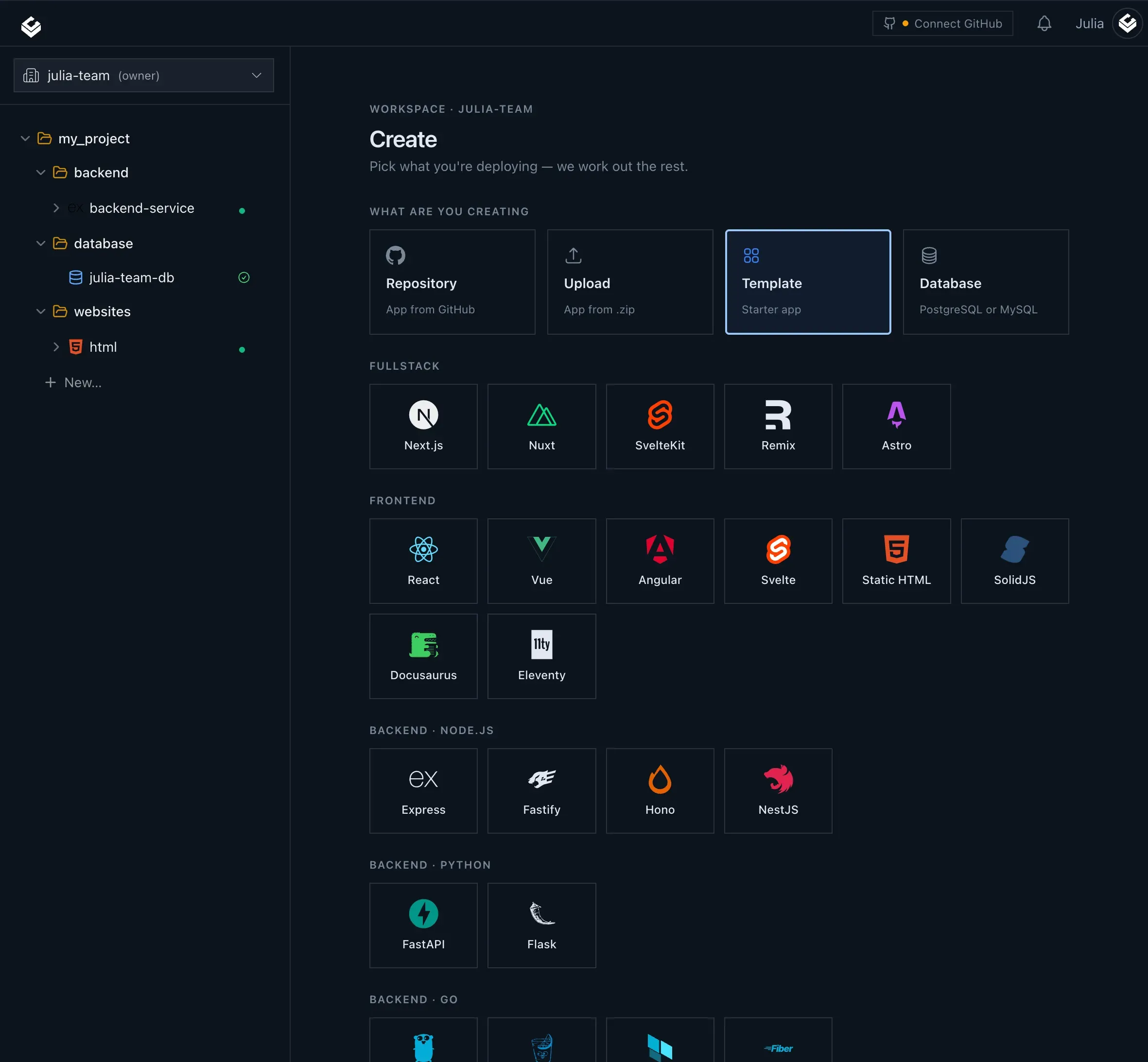
For developers who are tired of stitching together a mishmash of services to get a web application online, Light Cloud presents a compelling alternative. It is a deployment platform built around a simple promise: push to GitHub and ship in seconds. Instead of wrestling with cloud providers, CDNs, database configuration, and CI pipelines, Light Cloud unifies static sites, containers, and managed Postgres under one console. It also embraces AI assistants as a first-class interface, allowing developers to deploy and manage applications from natural language in Claude or GitHub Copilot. This review digs into the features, workflow, and practical value of Light Cloud for teams and solo developers alike.
Key Features
Light Cloud is not just another static site host. It reads the repository and decides whether to serve assets from a global CDN or spin up a container on Cloud Run. This full-stack approach removes the need for separate hosting services.
-
Unified Full-Stack Hosting: Deploy static frontends to a global CDN, run backend containers on Cloud Run, and provision a managed Postgres database from the same project. The platform detects the nature of the codebase and configures the appropriate target automatically, so there is no manual mapping of services.
-
Branch Previews: Every branch and pull request gets its own live URL. The preview is built on each push and removed as soon as the branch is deleted. This keeps production safe and gives reviewers a quick way to test changes before merge.
-
Scale-to-Zero Containers: Cloud Run-based containers scale down when idle, which means that staging and preview environments do not generate continuous charges. Developers only pay for the actual compute time consumed by real traffic.
-
AI-Driven Deploys: The MCP server allows Claude to create apps, trigger deployments, and read logs interactively. A VS Code extension adds @lightcloud to GitHub Copilot, enabling slash commands like /deploy, /status, and /plan. Framework detection and .env parsing are handled automatically, so talking to an AI is as effective as using the dashboard.
-
Integrated Observability: Build logs stream live, and running services have their logs and metrics displayed next to the environment. This consolidation reduces the need to jump between external monitoring tools.
-
Database Management: Managed Postgres can be provisioned with selected tier, region, and storage size. Credentials are encrypted and injected into the app environment, making database setup a matter of a few clicks.
For more technical details on configuration and deployment options, the official documentation offers comprehensive guides.
How It Works
The core workflow is built around Git. After signing up, users connect a GitHub repository. From that point, every push triggers a build. Light Cloud analyzes the repo structure to determine if it is a static site (e.g., a React or Next.js export) or a containerized service. For static sites, the files are deployed to a global CDN. For containers, a Dockerfile is built and deployed to Cloud Run. The dashboard shows a timeline of commits, authors, build times, and logs. For feature work, users can open a branch to generate an automatic preview URL; merging the branch updates the production deployment. If the team uses AI coding assistants, they can also send commands via chat: instruct Claude to deploy a branch, check the status of a service, or pull up logs. The VS Code extension surfaces the same capabilities within the editor, so developers can stay in their flow without context-switching.
Use Cases
-
Indie hackers and solo developers: With a free tier and simple Git-based deployment, side projects can go live quickly. The managed Postgres and container support mean even a complex application does not require a second hosting provider.
-
Development teams shipping frequently: Branch previews become a natural part of code review. Reviewers can click a URL instead of running the code locally. The scale-to-zero behavior keeps preview costs near zero.
-
AI-assisted development teams: Teams that rely on Claude or GitHub Copilot can delegate deployment tasks to the assistant. The MCP server reduces the repetitive manual work of creating environments and debugging deploy failures.
-
Agencies and freelancers: When building many small-to-medium projects, having a single platform for hosting, databases, and previews simplifies client handover and ongoing maintenance.
Pricing & Value
Light Cloud offers a Free plan, making it easy for developers to start without upfront costs. Paid plans are discussed on the pricing page, with tiers that introduce larger bandwidth, compute quotas, and additional databases. The platform is competitively positioned against services like Vercel, Netlify, and Render, especially because it bundles container hosting and managed Postgres. The AI-powered deployment workflow also adds a distinctive advantage that can save development time. For teams already invested in GitHub, the setup cost is minimal.
Final Verdict
Light Cloud delivers on its headline promise of rolling out web applications straight from GitHub. The integration of static files, containers, and database hosting in one console simplifies the stack for many projects, and the branch-preview workflow is polished. The AI integrations are forward-looking and genuinely functional rather than a gimmick. Bright spots include the scale-to-zero container model, which makes preview environments affordable, and the built-in observability that reduces tool sprawl. The platform is relatively young, so some edge cases and enterprise features may still be maturing, and a few developers might miss the flexibility of using other cloud providers. Still, for most teams looking for a fast, low-friction deployment solution, Light Cloud is a strong candidate and worth trying out. The documentation is clear, and the community is growing. For those exploring infrastructure-as-code, the open-source ICE project shows the direction of the platform.