Introduction
Documentation is one of those tasks that everyone knows is important but few do consistently—especially when it only happens a few times a year. MySOP.guru is a Chrome extension designed to solve this exact problem by letting users capture a workflow as they perform it, then export a professional-looking Standard Operating Procedure (SOP) PDF with just a few clicks. The pricing model is refreshingly different: the first export is free, and subsequent exports cost €5 per document, with no monthly subscription, no seat licenses, and no recurring fees. This makes it an attractive option for HR teams onboarding new hires, finance departments documenting month-end processes, consultants delivering client deliverables, and any small team that needs to document a process occasionally but doesn't want to maintain a dedicated documentation platform.
Key Features
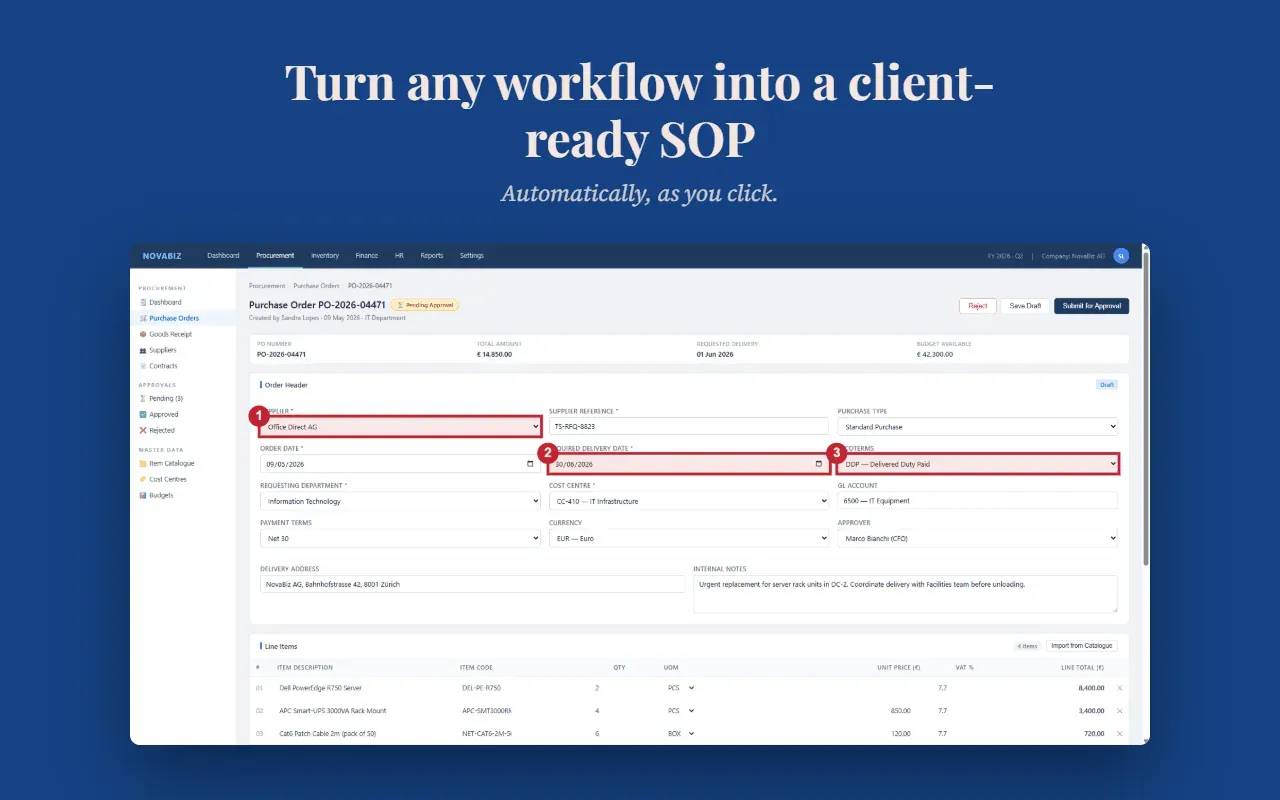
MySOP.guru packs a surprising number of features into a lightweight browser extension. The core functionality is automatic screenshot capture with numbered callouts. When a user starts a capture session, the extension records every click, form entry, and page navigation. Each interaction is highlighted with a numbered badge on the screenshot, so readers know exactly where to look. This is far more efficient than taking manual screenshots and stitching them together in a word processor.
The extension uses smart page grouping to keep documents concise. Multiple clicks on the same page are merged into a single step with a numbered sub-action list. For example, filling out a form with five fields becomes one step with five sub-actions, rather than five separate steps. This dramatically reduces page count and makes the resulting SOP easier to follow.
Once a capture is complete, users can open a full-featured editor to refine the document. The editor allows for drag-and-drop reordering of steps, inline editing of descriptions, splitting and merging steps, and deleting unnecessary content. Everything is available before any payment is required, so users can prepare a perfect document before spending a cent.
Export options include PDF and HTML. The PDF export is priced at €5 per document, while HTML exports cost €3. The PDF includes branding elements: users can upload their company logo, choose fonts, set colors, and configure headers and footers. This means the final document looks like it was produced by the user's own organization, not by a third-party tool. This white-label capability is particularly valuable for consultants and agencies that need to deliver branded documentation to clients.
Another key feature is the no-subscription, pay-per-export model. Users can install the extension, capture unlimited workflows, and edit them all for free. They only pay when they decide to export a document. This aligns costs with actual output rather than a fixed monthly fee. For teams that document twice a year, the cost is minimal compared to traditional documentation tools that charge $15–$29 per seat per month.
Security is also addressed. The extension only runs during an active capture session and does not monitor browsing in the background. Screenshots and exports are stored in EU infrastructure, and all traffic is HTTPS-encrypted. The extension only requires access to the user's own website URLs, and users can revoke access at any time. This makes it safe for use with sensitive business systems.
How It Works
The workflow is straightforward and takes just a few minutes. First, install the Chrome extension from the Chrome Web Store. After installation, a toolbar icon appears. To start capturing, the user clicks the icon and presses the "Start" button. The extension will then record every action within the current tab. The user performs the process exactly as they normally would—clicking through screens, filling forms, and navigating pages. Each action is captured with a full-page screenshot and a numbered badge.
Multiple pages and actions can be captured in a single session. When the user finishes, they click "Stop" and the captured steps appear in the editor. The editor displays a timeline of steps, each with a screenshot and a description. Users can easily rename steps, edit text, or add notes. Steps can be dragged into a new order, and extraneous steps can be deleted. The ability to split or merge steps provides additional flexibility.
After editing, the user clicks "Export PDF" and the document is generated instantly. The first export is free and requires no credit card. For subsequent exports, payment is handled through Stripe. Users can also purchase credit bundles to lower the per-document cost. The entire process—from capture to final PDF—is designed to be fast enough that a user can document a typical workflow in under five minutes.
Use Cases
MySOP.guru is built for anyone who needs to produce a professional SOP but does not do so daily. Real-world applications include:
- Human Resources: Onboarding new starters is a classic example. HR teams can document account setup, systems access, and first-week procedures while onboarding a single employee. The resulting SOP can then be reused for every future hire.
- Finance: Month-end close processes often rely on one person's memory. Instead of hoping that person never takes a holiday, the process can be captured once and transformed into a standard operating procedure.
- Operations: When a key employee leaves, a handover becomes a scramble. With MySOP.guru, the departing employee can document their workflow in the time it takes to run it once, turning institutional knowledge into a tangible asset.
- IT & Internal Systems: Whenever a tool changes—a new CRM, a new approval flow, or an updated admin panel—the new process can be documented immediately. This prevents a flood of support tickets and helps users adapt quickly.
- Consultants & Agencies: External consultants need to deliver clear, branded documentation to clients. MySOP.guru enables them to create polished PDFs that carry the client's logo and are ready for distribution on the day the implementation finishes.
- Any Small Team: Many teams have a process that lives only in a single person's head. MySOP.guru offers the fastest way to get that process out of the head and onto paper, preserving critical knowledge.
Pricing & Value
MySOP.guru's pricing is based on per-document exports rather than per-seat subscriptions. The first export is completely free, allowing users to generate a finished, branded document and assess the quality before paying anything. After that, a PDF export costs €5 and an HTML export costs €3. Prices exclude VAT, which is calculated at checkout where applicable.
For teams that export many documents, credit bundles reduce the per-document cost:
- 1 document: €5 (standard rate)
- 10 documents: €40 (€4 per doc, save 20%)
- 25 documents: €90 (€3.60 per doc, save 28%)
These bundles are valid for 24 months, and MySOP.guru sends email reminders before credits expire. This flexibility makes the tool extremely cost-effective for periodic documentation projects. There are no monthly fees, no seat limits, and no surprise charges. In months when no documentation is produced, the cost is zero. For teams that produce occasional SOPs, this model is significantly cheaper than a conventional subscription, which can cost over $100 per document when used only three times a year.
Final Verdict
MySOP.guru is a practical, well-designed tool that addresses a real pain point for teams that need to write procedures but do not do so regularly. The automatic screenshot capture and smart grouping make documentation fast and efficient, while the pay-per-export model removes the burden of a recurring subscription. The editor provides enough control to create documents that look professional and are easy to follow. The white-label branding feature is a standout, especially for consultants and agencies.
There are some limitations. The extension currently works only within a single web application per capture session; processes that span multiple applications need to be split into separate documents. It also cannot capture desktop software, which may be a challenge for teams that use native applications. Additionally, while the pay-per-document model is excellent for occasional use, heavy users would be better served by the credit bundles to reduce per-document costs.
Overall, MySOP.guru is a smart choice for HR, finance, operations, IT, and consulting teams that want to create high-quality SOPs without committing to a full documentation platform. The free first export makes it easy to evaluate, and the simple, one-time cost structure ensures that users only pay for what they actually use. If you found this review helpful, you can explore their blog for more use cases or read the privacy policy to understand their data handling. For more details about the product itself, visit the official website.